4 Essential Updates in the November 2025 Python VS Code Release
The November 2025 release of the Python extension for Visual Studio Code has arrived, bringing a set of powerful enhancements that streamline coding, documentation, and debugging. From AI‑powered docstring generation to smarter import management, this update is packed with features that every Python developer should know. Below, we break down the four most impactful changes that will boost your productivity and code quality.
1. Add Copilot Hover Summaries as Docstring
GitHub Copilot now lets you insert AI‑generated documentation directly into your code as proper docstrings. When you hover over a function or class definition, the hover summary includes an Add as docstring command. Click it, and the summary is placed below your cursor, formatted as a standard docstring. This eliminates the need to manually retype or reformat AI suggestions, making it easier to keep your code documented. The feature accelerates the documentation workflow, enhancing both readability and maintainability without extra effort.
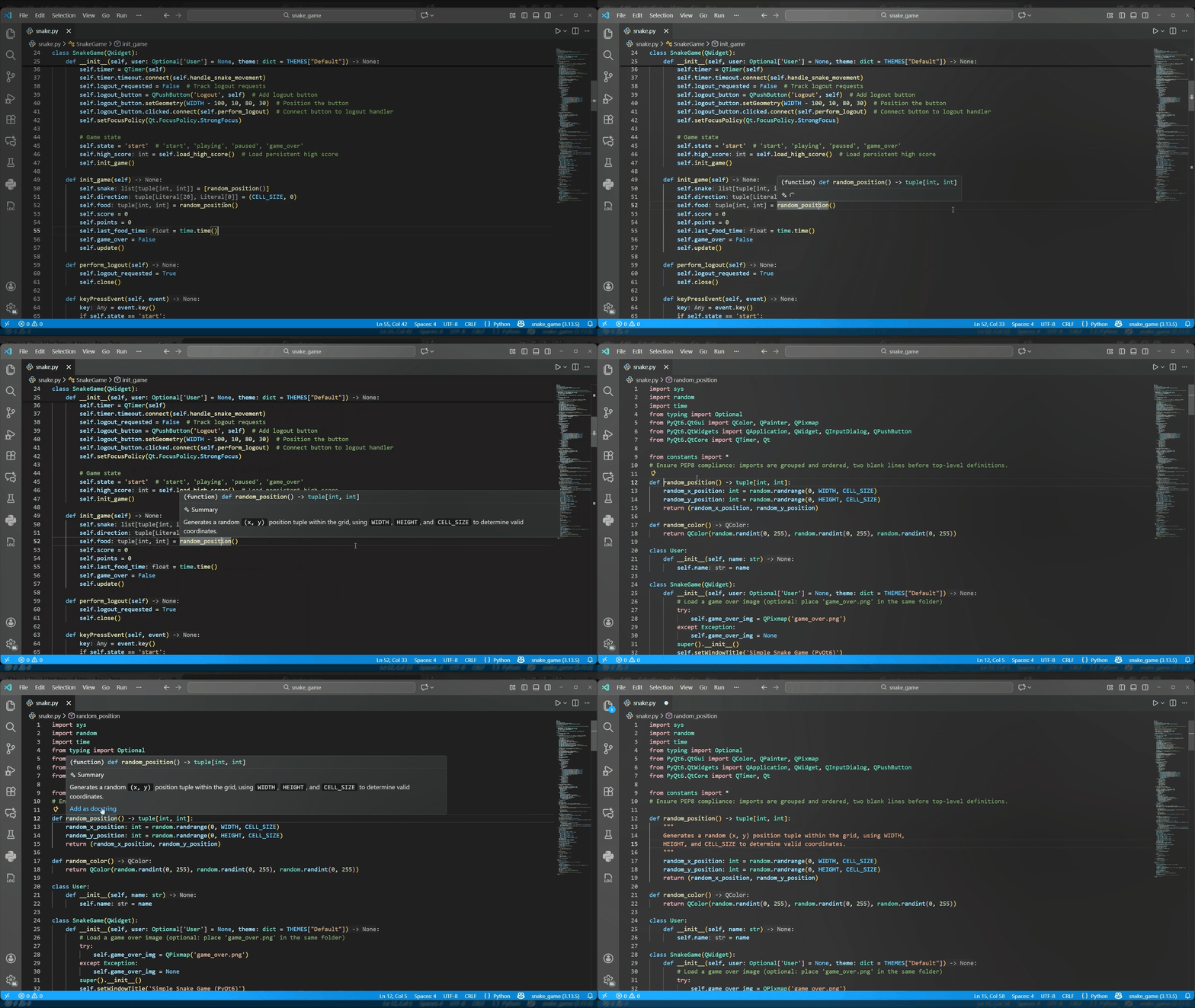
2. Localized Copilot Hover Summaries
GitHub Copilot’s hover summaries inside Pylance now respect your VS Code display language. If you have set your editor to a language such as French, German, or Japanese, the AI‑generated summaries will appear in that language. This localization makes the tool more accessible for non‑English speakers, allowing you to understand generated documentation in your preferred language. The change is seamless—simply set your display language in VS Code’s settings, and all summaries will automatically adapt.
3. Convert Wildcard Imports into Code Action
Wildcard imports (from module import *) are widely discouraged because they pollute the namespace and reduce code clarity. The new Pylance release introduces a Code Action that automatically converts these wildcards into explicit imports. Place your cursor on a line with a wildcard import, press Ctrl+. (or Cmd+. on macOS), and select Convert to explicit imports. The action preserves aliases and keeps everything in a single import statement, helping you modernize legacy code modules with minimal effort.

4. Debugger Support for Multiple Interpreters via Python Environments Extension
The Python Debugger now integrates with the Python Environments Extension to recognize separate interpreters for each project in a workspace. If you work with multiple folders—each configured with its own Python version—the debugger will automatically use the interpreter shown in the status bar for debugging. To activate this functionality, set "python.useEnvironmentsExtension": true in your user settings. This improvement is especially valuable for monorepos or multi‑project setups where different environments need to be isolated. Report any issues to the Python Debugger repository.
More Small but Welcome Improvements
Beyond these headline features, the release includes several smaller enhancements and bug fixes requested by the community. Among them is a fix for unexpected blocking delays during debugging sessions. These refinements build on the overall stability and user experience, ensuring that your Python development in VS Code remains smooth and reliable. For the complete changelog, visit the Python and Pylance extension pages.
Whether you’re a seasoned Pythonista or just starting, these updates make coding more efficient and enjoyable. Update your Python extension today and try out the new capabilities—from AI‑powered docstrings to smarter debugging across multiple interpreters.