How to Harness Speculative Inlining and Deoptimization for WebAssembly in V8
Introduction
Speculative optimizations have long turbocharged JavaScript execution in V8, but they're now making waves for WebAssembly—especially with WasmGC. Starting with Chrome M137, V8 employs speculative call_indirect inlining and deoptimization support to squeeze more speed out of WebAssembly binaries. This guide walks you through the principles, implementation steps, and practical tips to leverage these techniques in your own projects, whether you're compiling Dart, Kotlin, or Java to WasmGC.
What You Need
- V8 engine version M137 or later (bundled with Google Chrome 137+)
- A WebAssembly binary compiled with WasmGC support (e.g., from Dart, Kotlin, Java, or any language targeting the GC proposal)
- Runtime profiling infrastructure (V8’s built-in feedback collection, no external tools required)
- Optional: A set of microbenchmarks (like Dart’s) to measure speedups
- Basic understanding of JIT compilation, inlining, and type feedback
Step 1 – Understand the Foundation: Why Speculative Optimizations Matter for Wasm
JavaScript’s JIT compilers rely on assumptions made from runtime feedback. For instance, if a + b has always been an integer addition, the compiler emits fast integer code. If the assumption later fails, V8 deoptimizes—abandons the optimized code and falls back to a slower, safe path. WebAssembly 1.0 didn’t need this because types are static and toolchains like LLVM already pre-optimize. But with WasmGC, high-level operations (structs, arrays, subtyping) benefit greatly from speculating on concrete types and call targets.
Step 2 – Enable Runtime Feedback Collection for WebAssembly
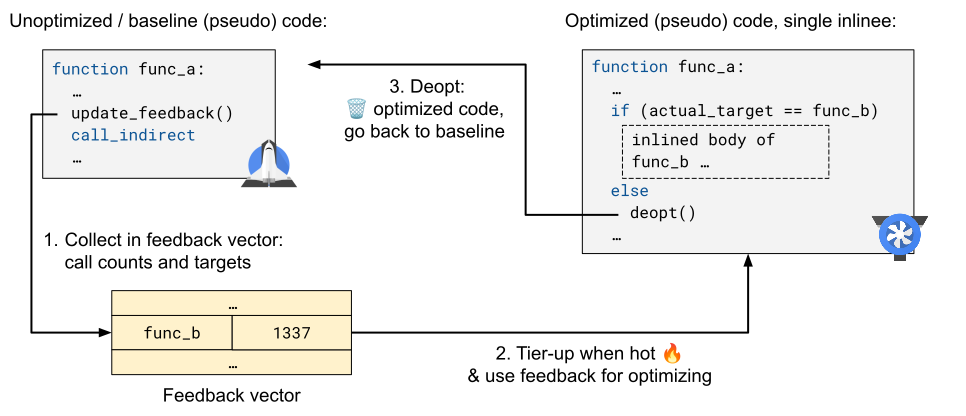
V8 already collects type and profile data for JavaScript. For WebAssembly, you need to ensure the code is executed enough times to gather meaningful feedback. In Chrome, this happens automatically: the engine tiers up from baseline liftoff to optimized TurboFan code after a threshold. To see feedback in action, you can use the --trace-wasm-inline or --trace-deopt flags in a debug build of V8, but for production just run your app multiple times under realistic load.
Step 3 – Apply Speculative call_indirect Inlining
The call_indirect instruction (the WebAssembly equivalent of a virtual function call) usually dispatches through a table. V8 now tracks the most common target for each call site. When running hot, it inlines that target directly, inserting a guard to check the actual target matches. This eliminates the indirect call overhead and enables further optimizations on the inlined code. To trigger this, your Wasm binary should contain frequent indirect calls—common in object-oriented WasmGC code.
Step 4 – Implement Deoptimization Support
If the speculated target changes (e.g., a different subtype executes later), the guard fails. V8 then deoptimizes: it discards the optimized code, restores execution state, and resumes with the baseline liftoff code. This is a safe, automatic recovery mechanism. No action is needed from you—V8 handles it internally. However, understanding deopt helps you profile performance: if you see many deopts, your program may have polymorphic call sites that could be restructured (e.g., by using more specific types or monomorphization).
Step 5 – Combine Inlining and Deoptimization for Maximum Benefit
The magic happens when both optimizations work together. Inlining alone could cause code bloat if many indirect calls are inlined speculatively; deopts act as a safety net. V8’s implementation (as of M137) balances both: it inlines only hot, stable targets and relies on deoptimization to handle cold paths. For Dart microbenchmarks, this combo yields over 50% speedup on average. Larger real-world apps (e.g., Flutter widgets) see 1% to 8% improvement.
Step 6 – Measure and Tune Performance
Use Chrome’s DevTools (Performance panel) or V8’s internal tracing to monitor deopts and inlining decisions. Look for Deoptimize entries in the timeline. If you see frequent deopts at a particular call site, consider:
- Making the call site monomorphic (ensure only one concrete type is used)
- Using
selectstatements in WebAssembly to guide the compiler - Rewriting hot paths to avoid indirect calls entirely (e.g., via function specialization)
Run your benchmarks with and without these optimizations (e.g., by toggling Chrome flags if available) to isolate the effect.
Tips
- WasmGC code benefits most – If you’re using C/C++/Rust (Wasm 1.0), the gains are smaller because static types already limit speculation opportunities.
- Microbenchmarks vs. real apps – The 50%+ speedup seen in Dart microbenchmarks is a best-case scenario. In large applications, other overheads (I/O, layout) dominate, so expect 1–8% – still a welcome boost for free.
- Deoptimizations are not failures – They are a normal part of speculative execution. A high deopt count might indicate unstable feedback, but it doesn’t break correctness.
- Keep your toolchains updated – Emscripten, Dart2Wasm, Kotlin/Wasm, etc. may emit patterns that interact well with V8’s new optimizations.
- Experiment with different workload sizes – Speculative inlining works best on code that runs many times. A short-lived script might not tier up enough to trigger optimizations.