Mastering KV Cache Compression with TurboQuant: A Practical Guide
Overview
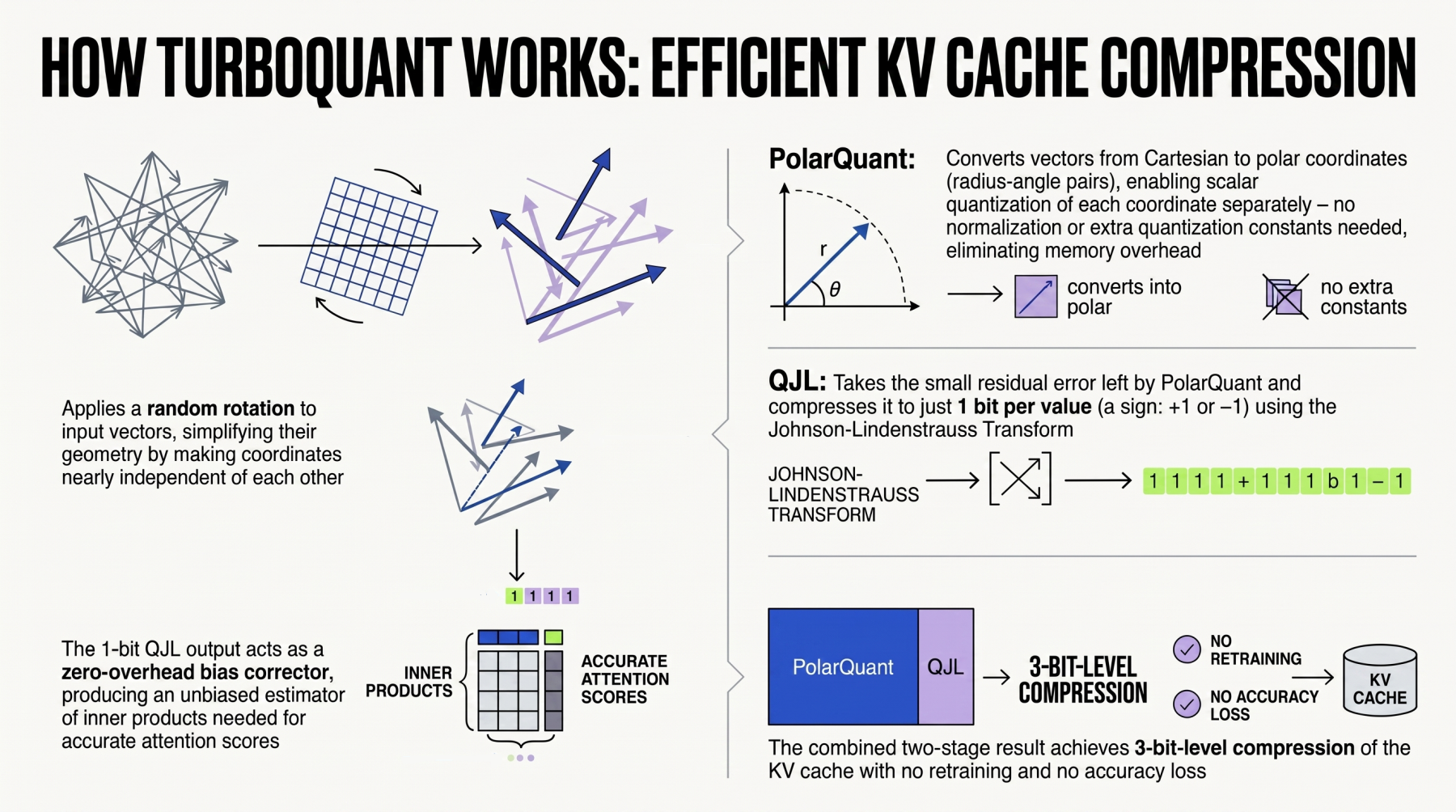
Large language models (LLMs) generate text token by token, relying on a key-value (KV) cache to store previous attention representations and avoid redundant computation. However, as sequence lengths grow, this cache becomes a memory bottleneck, limiting batch size and throughput. TurboQuant, recently released by Google, is a suite of algorithms and a library designed to apply advanced quantization and compression techniques to LLMs and vector search engines. In this guide, we focus on one of its most impactful features: KV cache compression. By reducing the bit-width of KV tensors from 16-bit (FP16) to lower precisions (e.g., 4-bit or 2-bit), TurboQuant can dramatically cut memory usage while preserving model quality. This tutorial walks you through the process—from installation to optimization—so you can shrink memory footprint and speed up inference in your own applications.
Prerequisites
Before diving in, ensure you have the following:
- Python 3.9+ and a working environment (conda/venv recommended).
- PyTorch 2.0+ with CUDA support (for GPU acceleration).
- Basic familiarity with LLM inference, attention mechanisms, and quantization concepts.
- TurboQuant library – install via
pip install turboquant(check the official repo for the latest version). - A pretrained model such as LLaMA‑2, Mistral, or Falcon. We’ll use
meta-llama/Llama-2-7b-chat-hfas an example.
Optionally, have transformers, accelerate, and bitsandbytes installed for model loading and baseline comparison.
Step-by-Step Guide
1. Install and Import TurboQuant
First, install the library and import the necessary modules:
pip install turboquantThen in your script:
import torch
from transformers import AutoModelForCausalLM, AutoTokenizer
from turboquant import TurboQuant, QuantConfig
2. Load the Base Model
Load your chosen model and tokenizer in FP16:
model_name = "meta-llama/Llama-2-7b-chat-hf"
tokenizer = AutoTokenizer.from_pretrained(model_name)
model = AutoModelForCausalLM.from_pretrained(
    model_name,
    torch_dtype=torch.float16,
    device_map="auto"
)
3. Configure KV Compression Parameters
TurboQuant exposes a QuantConfig object. For KV cache compression, you specify:
- kv_bit: number of bits per key/value element (e.g., 4 or 2).
- kv_group_size: group size for quantization (commonly 32 or 64).
- kv_sym: whether to use symmetric quantization (recommended for attention).
- calibration_size: number of tokens used to calibrate quantization ranges (e.g., 512).
Example configuration:
config = QuantConfig(
    kv_bit=4,
    kv_group_size=32,
    kv_sym=True,
    calibration_size=512
)
4. Apply TurboQuant Compression
Wrap the model with TurboQuant. This modifies the attention layers to compress KV cache during generation:
turbo_model = TurboQuant(model, config)If you want to calibrate with a representative sample, pass a small dataset:
from datasets import load_dataset
calib_data = load_dataset("wikitext", "wikitext-2-raw-v1", split="test")
# Take first 10 examples
calib_texts = calib_data[:10]["text"]
turbo_model.calibrate(calib_texts, tokenizer)
5. Run Inference and Measure
Generate text with compression active:
input_text = "What is the capital of France?"
inputs = tokenizer(input_text, return_tensors="pt").to("cuda")

with torch.no_grad():
    outputs = turbo_model.generate(**inputs, max_new_tokens=100)

print(tokenizer.decode(outputs[0], skip_special_tokens=True))
To measure memory savings, monitor CUDA memory before and after:
import torch.cuda as cuda
mem_before = cuda.memory_allocated()
# run generation...
mem_after = cuda.memory_allocated()
print(f"KV cache memory: {(mem_after - mem_before) / 1e6:.2f} MB")
Compare with the uncompressed model by running the same generation without TurboQuant.
6. Evaluate Quality Impact
Quantization can degrade perplexity. Use a validation set to measure changes:
from evaluate import load
perplexity = load("perplexity", module_type="metric")
results = perplexity.compute(predictions=[output_text], references=[expected_text])
print(results)
7. Tune Parameters
If accuracy drops too much, adjust kv_bit upward (e.g., 4→6) or increase kv_group_size. Experiment with different calibration datasets. See the Tuning Parameters section in our docs for more guidance.
Common Mistakes
Over-Compressing Without Calibration
Jumping directly to 2-bit quantization without collecting calibration statistics often leads to catastrophic loss of quality. Always run calibrate() with a dataset that matches your deployment domain.
Forgetting to Use Symmetric Quantization for Attention
KV values in attention are roughly symmetric around zero. Using asymmetric quantization (kv_sym=False) can waste a bit of dynamic range. Enable symmetry to maximize precision per bit.
Neglecting Group Size Impact
Small group sizes (e.g., 8) retain more granularity but increase compute overhead. Large groups (128+) are efficient but coarser. Start with 32 or 64 as a balanced choice.
Not Monitoring GPU Memory Fragmentation
Compression reduces allocation size but may increase allocation count, leading to fragmentation. Use cuda.memory_summary() to check and consider pre‑allocating a cache pool if needed.
Summary
TurboQuant provides a powerful, easy‑to‑use approach to compress the KV cache in LLMs, cutting memory usage by up to 4× (e.g., FP16→4‑bit) while maintaining near‑original model quality. In this tutorial, you learned how to install TurboQuant, configure quantization parameters, apply compression to a transformer model, and measure both memory savings and quality impact. By following the step‑by‑step instructions and avoiding common pitfalls, you can integrate TurboQuant into your inference pipeline to increase throughput and enable longer context windows. Experiment with different bit‑widths and calibration strategies to find the sweet spot for your application. For advanced use cases (e.g., vector search compression), consult the official TurboQuant documentation.